
Spificator: a Usability Pattern for DApps
In this post, we would like to propose a new usability pattern for dapps.
In this post, we would like to propose a new usability pattern for dapps.
 Spificator
The challenge with dapps
Dapps have slow reaction times when it comes to saving information. Simple operations take tens of seconds and occasionally a couple of minutes. It happens when you send an ethereum transaction and wait for it to be mined. It is also the case for other distributed technologies. It is not uncommon to wait 30 seconds for pictures from IPFS to save or load.
It is going to be a significant problem for dapp adoption, as users these days are not used to waiting.
DApp designer dilemma:
A common dilemma for DApp designer is: What to do with UI when waiting for any particular operation to complete or fail?
Do you block the application the whole time? Or do you allow a user to continue using the dapp? In the first case, you force a user to wait unreasonably long time. In the second case, you risk a sudden change of application state, when an operation is complete. This leads to either inconsistent UI or unexpected flipping in the interface.
Constraints
Let’s examine constraints, of those operations:
- any operation might be successful, or it might fail
- time taken for any single operation is unpredictable, can be low seconds, occasionally can be a couple of minutes
- we don’t know what the progress of the operation is, so we can’t show a progress bar or any other indicator
- in a general case, we don’t know what future UI change might be, a simple transaction on the blockchain might result in multiple changes in many UI parts
- multiple operations might be in progress at once
- in many cases, we would like a user to be able to perform other actions, be aware that something is happening and inform him once an operation is complete
Introducing Spificator
Constraints above lead us to propose a new UI pattern, we call Spificator. It is a combination of spinner and notifications.
Spificator is a persistent part of UI, similar to notifications icon, most likely placed somewhere near menu bar.
 Spificator
At all times Spificator shows primary information about the status of operations:
- Are there any operations in progress at any given moment?
One operation in progress
- Are then any new operations that succeeded or failed?
 One operation successful
- There can be multiple operations happening at the same time.
 Spificator with 39 successful operations and two fails.
If a user clicks on it, she will be presented detailed list — similar to notification list used widely in web applications.
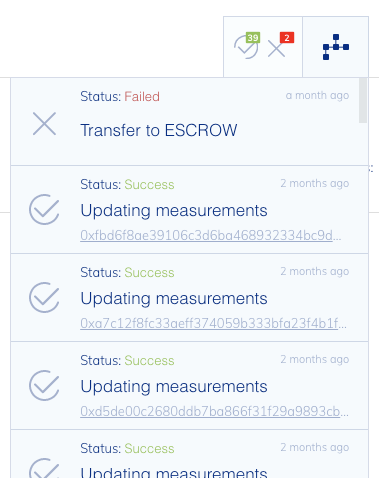 Spificator with notifications open
Spificator API
A nice thing about Spificators is they are easy to use once you implemented generic API. We implemented generic TransactionBuilder, which requires just a couple of lines of code to wrap any blockchain transaction with Spificator UI:
new TransactionBuilder(dispatch, aBlockchainOperations()
    .setTitle('Creating market')
    .onTxCallback((tx) => onTransactionPropagation() )
    .onSuccessCallback((market) => onTransactionMined()))
    .send();
aBlockchainOperations is a particular blockchain operation (returns a promise),onTransactionPropagation and onTransactionMinedhandle custom application code.
A new version supporting web3js 1.0 is coming.
Feedback welcome
You can play with Spificator in Ambrosus marketplace demo here.
(Note: Running on kovan network)
Let us know in the comments what you think about Spificator. We will be happy to extract it to a separate library for you guys to use if you like it!
If you enjoyed this post, please hit the clap button below 👏👏👏
Comments
Loading comments…